Instructional Design Portfolio · Case Study
Intro to Python Programming
Module 1 — Complete Course Design Package
Backward Design
Universal Design for Learning
DEIJ-Informed
AI-Adaptive Assessment
Canvas LMS
Jupyter Notebook
Canvas Commons-Ready
Audience
First-Year Undergraduates
Modality
Fully Asynchronous
Platform
Canvas LMS + Jupyter
Learning Objectives
6 Measurable Outcomes
Project Overview
A complete instructional design package for Module 1 of an undergraduate Python programming course, built for learners who may be new to Python, new to U.S. academic culture, or learning in multilingual contexts. The module applies backward design, UDL, and DEIJ-aware examples throughout — grounded in learner personas drawn from Bay Area tech workforce demographics and institutional data. All materials are Canvas-native, evidence-based, and Canvas Commons-ready.
Learning Objectives
1Define a variable and describe its purpose in a Python program
2Identify and differentiate Python's basic data types: str, int, float, bool
3Collect user input with input() and display output with print()
4Convert values between types using int() and float()
5Write a Python script using variables, type conversion, and I/O
6Reflect on how data is processed by explaining their script in writing
What's Included
Course Pages (Canvas-Formatted)
- Getting Started in Module 1
- Installing Python & Jupyter Notebook
- What is Jupyter Notebook?
- Syntax Reference Sheet
- AI Integration: Adaptive Assessment
- Extra Practice: Variables & String Games
- Module 1 Overview
Assignments & Activities
- Getting to Know One Another
- Guided Practice — Variables
- Guided Practice — Operators
- Mini Coding Practice Discussion (UDL choice-based; 6 options)
- Capstone: AI Energy Cost Calculator
Guided Practice Jupyter Notebook
- Structured explanations & code demos
- Debugging challenges
- Mini tasks & reflection prompts
- Mirrors Canvas page flow exactly
Supporting Design Materials
- Learner personas + design rationale
- LX/UX evaluation artifact
- Rubric aligned to learning objectives
- Canvas Commons-ready description
- AI-adaptive assessment (LTI integration)
Guided Practice Jupyter Notebook
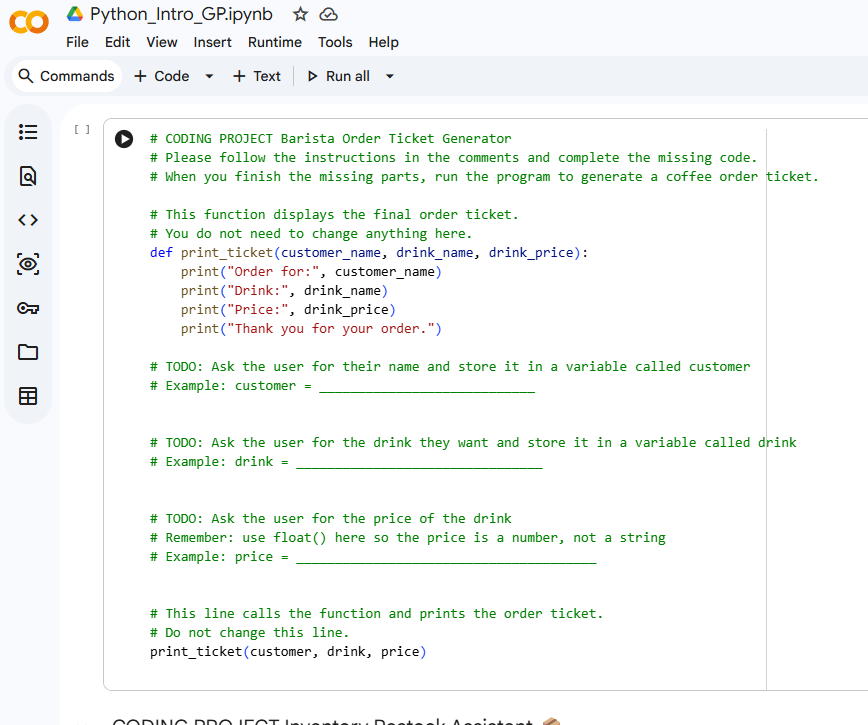
SFBU Python Module 1 — Variables Guided Practice
Structured explanations, code demonstrations, debugging challenges, mini tasks, and reflection prompts, mirroring the Canvas page flow for a seamless learning experience.
To view online: open the link and click Open with Google Colaboratory. To download: click File → Download from the Drive preview.
View / Download Notebook
Structured explanations, code demonstrations, debugging challenges, mini tasks, and reflection prompts, mirroring the Canvas page flow for a seamless learning experience.
To view online: open the link and click Open with Google Colaboratory. To download: click File → Download from the Drive preview.
Deliverables at a Glance
- 9 Canvas course pages with UDL elements
- 5 structured assignments (scaffolded)
- Jupyter Notebook guided practice (.ipynb)
- Rubric aligned to all 6 objectives
- Learner personas + design rationale
- LX/UX evaluation artifact
- AI-adaptive assessment (LTI integration)
- Canvas Commons-ready package
Design Approach
Backward Design
All activities and assessments mapped directly to the six learning objectives before content was developed.
UDL & Accessibility
Multiple means of representation and engagement, choice-based mini tasks, varied formats, and culturally aware examples.
AI-Enhanced Assessment
LTI-integrated adaptive engine provides personalized feedback aligned to learner performance data.
Capstone Assessment
AI Model Training Energy Cost Calculator
An authentic, real-world coding project connecting Python fundamentals to AI systems. Students build a working script calculating computational energy cost, demonstrating variable creation, data types, I/O, type conversion, and written reflection. Includes a Python starter file, submission guidelines, and a rubric aligned to learning objectives.
Explore Sample Artifacts
View course pages, assignment sheets, the Jupyter Notebook, learner personas, rubric, and LX/UX evaluation materials from this module.
View Sample Artifacts
View course pages, assignment sheets, the Jupyter Notebook, learner personas, rubric, and LX/UX evaluation materials from this module.
Design Highlights
Learner Personas
Personas representing linguistic, cultural, and technical diversity, drawn from Bay Area tech workforce demographics and institutional data, shaped pacing, examples, and support structures throughout.
DEIJ-Aware Content
Scenarios, examples, and discussion prompts were designed to avoid culturally bound assumptions and remain accessible to multilingual and international learners.
Cognitive Load Management
Scaffolded task sequence, from guided practice to debugging challenges to open-ended capstone, aligns cognitive demand with progressive skill development.
Seamless Tool Integration
Jupyter Notebook mirrors Canvas page flow exactly, creating a coherent experience across environments without requiring learners to reorient between tools.